
Tools & Reference
Xe Convert
FreemacOSA fast, focused Mac app for batch converting and resizing images — built by Xenon Post for everyday post-production work.
What it does
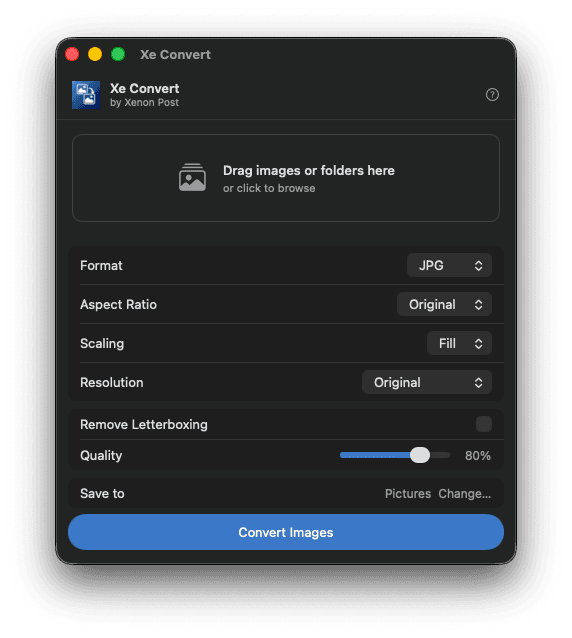
Xe Convert lets you drop images or entire folders onto its window and convert them all in one go. Choose your output format, aspect ratio, resolution, and quality — then hit Convert. That’s it.
Built for post-production workflows where you regularly need delivery stills, social crops, or format conversions without reaching for Photoshop.
How it works
Add images
Drag images or folders onto the drop zone, or click to browse. Xe Convert finds all supported images automatically.
Choose settings
Pick your output format, aspect ratio, resolution, and quality using the controls below the image strip.
Set destination
Click Change… next to Save to and choose where converted files should go. Defaults to your Pictures folder.
Convert
Press Convert Images. A progress bar tracks each file. When done, a summary shows how many converted successfully.
Download
Xe Convert 1.4 — Free
macOS · Universal binary · 3.6 MB